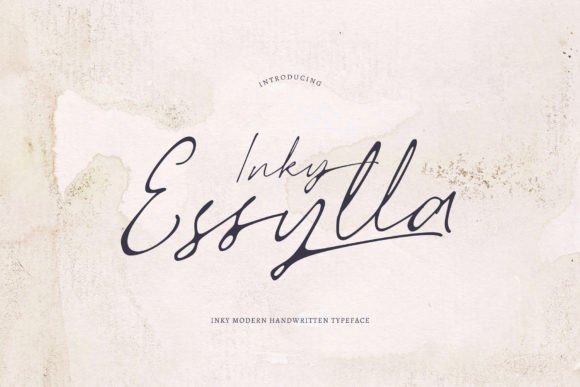
Inky Essylla: A Dazzling Script Font
There I was, staring at a blank brand board, trying to figure out how to make a small café feel both warm and modern. The client wanted something that felt personal but also professional. That’s when I reached for Inky Essylla.
This script font has this elegant, almost handwritten charm, but with a level of detail that makes it feel polished. It's not just any script—it's one that can carry the weight of a brand while still feeling approachable. The curves are smooth, the strokes are consistent, and there's a certain grace in every letter that makes it stand out.
I started by testing it on a logo draft. The first thing I noticed was how it added a sense of movement to the design. It wasn’t too ornate, but it had enough character to make the brand feel unique. I paired it with a simple sans serif for balance, and it worked surprisingly well. The contrast made the logo pop without being jarring.
Bringing a Café to Life
As the project moved forward, I used Inky Essylla for everything from signage to packaging. On a shop sign, it gave the café a friendly, inviting vibe. On a label sticker, it added a touch of sophistication. It felt like the font was adapting to each use case, which is a rare quality in a script typeface.
One of the things I appreciated most about Inky Essylla was its versatility. It didn’t feel limited to just logos or headlines. I used it on a homepage hero section, where it caught the eye without overwhelming the content. On social media graphics, it helped create a cohesive visual language across different platforms.
The font also worked well in editorial design. Whether it was a menu layout or a flyer for an event, Inky Essylla brought a sense of personality to the text. It wasn’t just about looking good—it was about making the message feel more human.
Designing with Purpose
When working with clients, I always stress the importance of testing a font before committing to it. Inky Essylla is no exception. I recommend creating a few mockups—business cards, packaging, website headers—and seeing how it looks in different sizes and contexts. Sometimes a font that looks great on a screen doesn’t translate well to print, and vice versa.
Another thing to consider is readability. While Inky Essylla is highly detailed, it’s still legible at larger sizes. That makes it ideal for display purposes, like headlines or branding elements. But if you're planning to use it for body text, you might want to pair it with a more traditional typeface for better clarity.
Font pairing is another area where Inky Essylla shines. I often pair it with a clean serif or sans serif to create contrast and balance. This helps keep the design from feeling too busy, especially when using it as a headline or accent font.
Practical Tips for Designers
If you're considering Inky Essylla for your next project, here are a few things to keep in mind. First, check what styles and weights are included. Some script fonts come with only a few options, which can limit your design flexibility. Inky Essylla, however, offers a range of variations that make it easier to work with.
Also, pay attention to ligatures and alternates. These can add subtle visual interest and help differentiate your design. Multilingual support is another factor to consider, especially if your brand serves a global audience.
When it comes to commercial use, make sure you understand the licensing terms. Inky Essylla, as part of the Script Amp collection, is designed for professional use, so it should be compatible with most design workflows.
Final Thoughts
Using Inky Essylla in a real branding project was a rewarding experience. It brought a sense of elegance and personality to the design, and its versatility made it easy to integrate into different parts of the brand system. Whether you're working on a café, a boutique, or a creative studio, this font has the potential to elevate your work.
It’s not just a pretty script—it’s a tool that can help you tell a story through typography. And in the world of design, that’s always worth having in your toolkit.